Corporate IT Solutions for Nepal and Beyond

DBS Consultancy builds digital platforms and repair support for business growth.

We support HR, school, travel, matrimony, WhatsApp automation, laptop repair and printer repair services.

Matrimonial Biha.com for verified Nepali profiles
HR Solution Portal, mobile app, WhatsApp chat and CV parsing
School and Travel Portal, mobile app and WhatsApp integration

Country Language Dashboard

Choose your country and language.

Change the home screen message for India, UAE, Brazil or Mexico before starting a campaign.

Market Focus

Local business lead capture

Website chat, WhatsApp automation and service enquiry collection for small and growing businesses.

Best Services

Recruitment, repair and bookings

Use country-wise messaging for HR, travel, school, real estate, repair, retail and digital marketing.

Action

Start with a demo

Show visitors how DBS captures name, phone, email and requirement in their language.

Featured Products

Platforms with portal, app and WhatsApp.

DBS Consultancy designs complete products, not just pages. Each product supports registration, admin workflow, customer communication, mobile access and smooth WhatsApp chat automation inside the business process.

biha.mydemosolutions.com

Biha.com Matrimonial

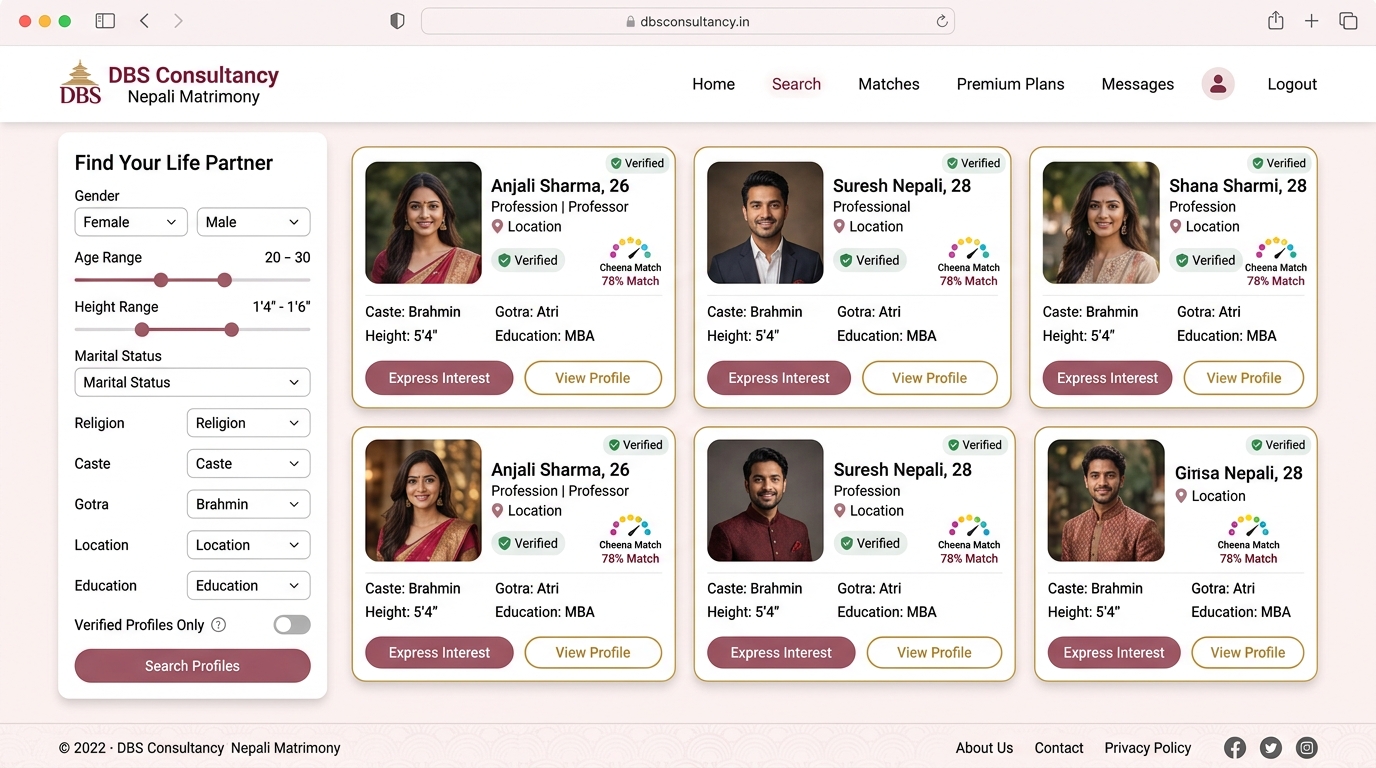
A Nepali matrimonial site where users can register themselves, create marriage profiles, share family details, search suitable matches and connect through portal, mobile app and WhatsApp chat.

Open Biha Solution
hrsolution.mydemosolutions.com

Complete HR and Job Solution

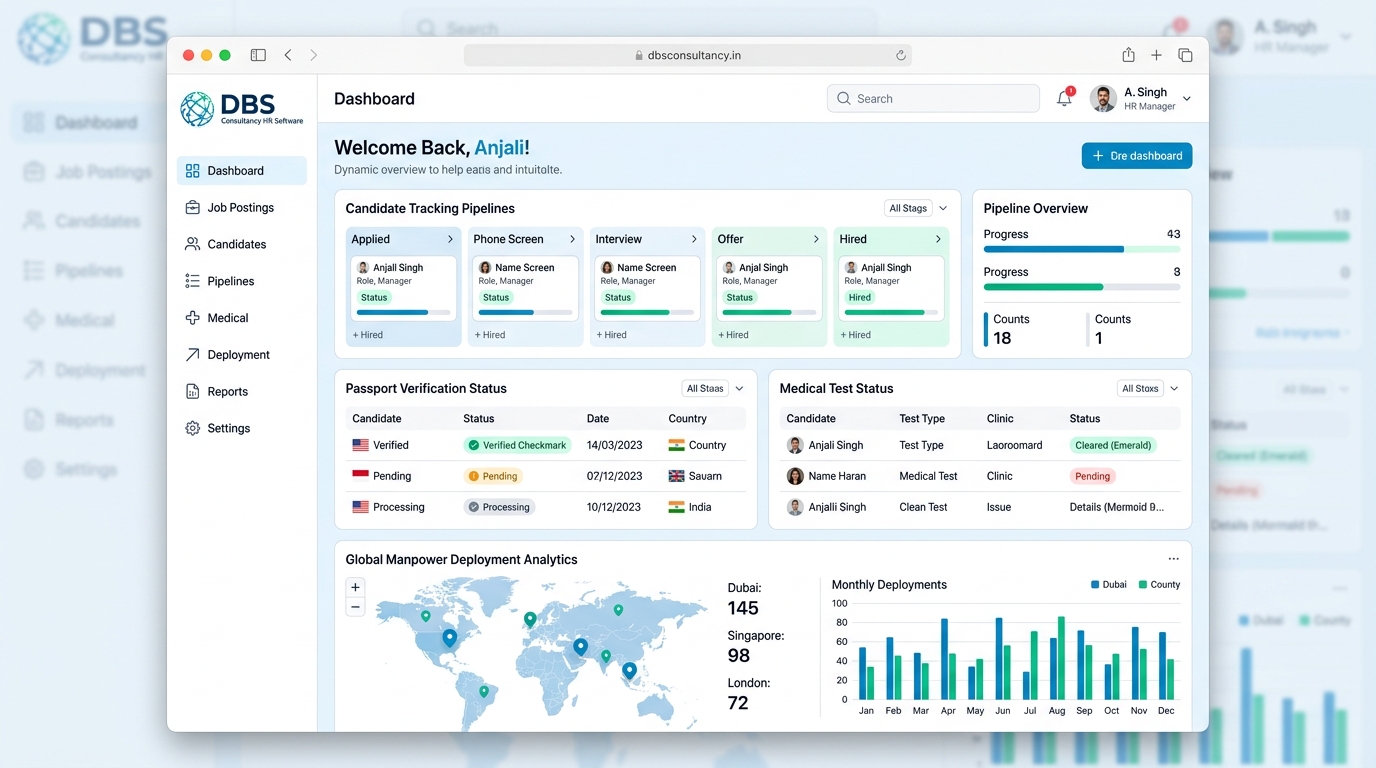
A full hiring platform where clients, jobseekers and recruitment teams interact through portal, mobile app, WhatsApp chat, CV parsing and job status tracking.

Open HR Solution Admin Panel
hrsolution.mydemosolutions.com/teamdashboard

Overseas Recruitment Solution

Manage overseas jobs, vacancies, candidate documents, CV parsing, shortlist, interview, medical, visa and deployment status with portal, mobile app and WhatsApp chat.

Team Dashboard URL
School Management

School Management Solution

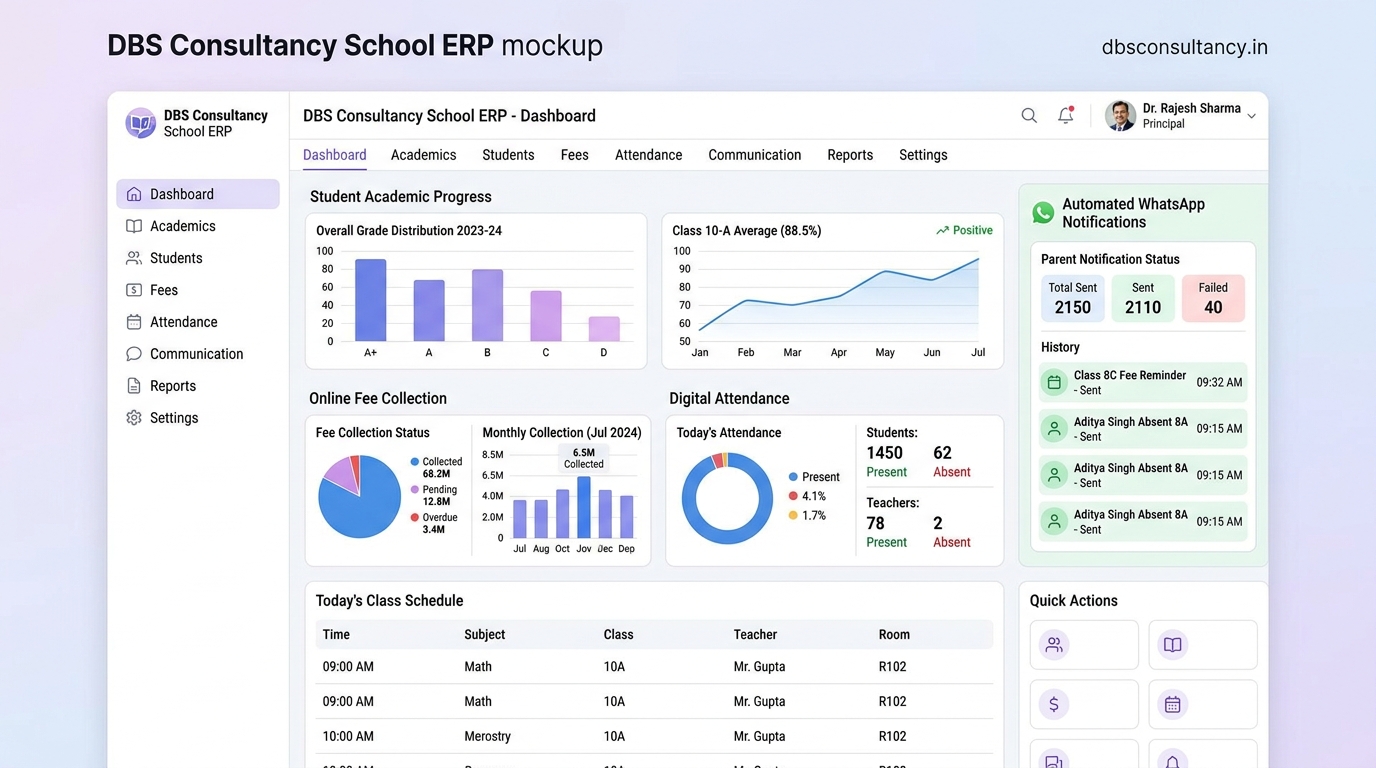
School.mydemosolution.com supports school administration, student records, admission, fees, notices, parent communication and reporting through portal, mobile app and WhatsApp integration.

Open School Solution
Tour & Travel

Travel Booking Solution

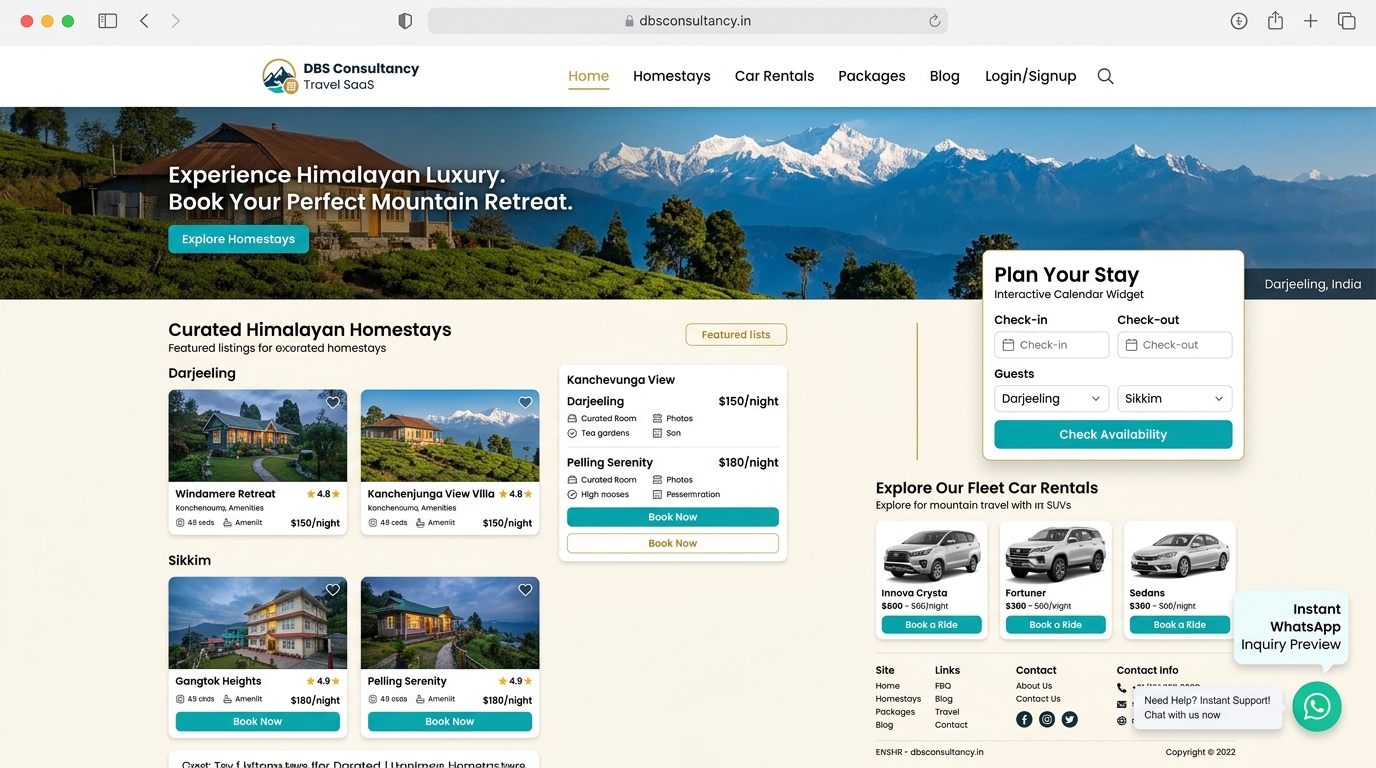
A tour and travel platform for hotel booking, homestay booking, tour packages, travel packages and car booking, with portal, mobile app and WhatsApp enquiry integration.

Open Tour & Travel

WhatsApp Inside Every Solution

WhatsApp Automation

Use WhatsApp inside HR, overseas recruitment, automobile, real estate, school, travel and service workflows for enquiries, registrations, bookings, job applications, document collection and status checks.

Recruitment

WhatsApp Recruitment Bot

Let jobseekers check jobs, vacancies and recruitment status through WhatsApp. The flow can collect candidate details, CVs, documents, preferred job type and application status for domestic and overseas hiring.

  • WhatsApp Job Application Flow
  • WhatsApp CV & Document Collection
  • WhatsApp Status Check Bot
Automobile

WhatsApp Vehicle Enquiry Bot

Show automobile enquiry cards for scooter, scooty, bike and cars. Customers can ask for model details, price, availability, booking, test ride and follow-up through WhatsApp.

  • Scooter and scooty enquiry cards
  • Bike and car model details
  • Lead capture and booking follow-up
Real Estate

WhatsApp Property Enquiry Flow

Display real estate leads for flat, land, property, bungalow and 1BHK options. Buyers can check location, size, price, property type and site visit booking through WhatsApp.

  • Flat, land and property details
  • Bungalow and 1BHK enquiry cards
  • Visit booking and customer registration

AI Website Chat to WhatsApp Leads

Add a smart AI chat assistant to your website or online store. It responds instantly, captures contact details, qualifies enquiries and sends structured leads directly to your WhatsApp workflow.

  • Capture more enquiries while visitors are still on your site
  • Collect name, phone, email, requirement, intent and timeline
  • Send qualified leads to WhatsApp and admin follow-up
Discuss on WhatsApp

Recruitment WhatsApp Automation

Built into the HR and recruitment solution, the automation guides jobseekers, captures CV and documents, qualifies vacancy enquiries and keeps every lead organized for team follow-up.

  • Natural chat flow for vacancy and job application enquiries
  • Lead qualification for job type, location, documents and status
  • Track every enquiry from website, campaign, source and device
Call 8116970207
AI Chat

Natural Conversations

Engage visitors with clear, human-sounding answers that keep the conversation moving and encourage action.

Qualification

Lead Capture Built In

Collect names, phone numbers, email addresses, service preferences, job details, timeframe and intent.

Control

Customise and Track

Tune the questions, shape the assistant around your service, and see which pages and campaigns create quality leads.

DBS AI Chat Lead Assistant

Built to convert more visitors, not just answer questions.

When someone lands on your website, they do not want to dig through pages or fill out long, confusing forms. DBS AI Chat starts the conversation, guides each visitor and finds out what they actually need, so you get clearer and more qualified leads.

Context

Get the Job Context

The assistant asks the right questions and captures the information you need, so your team follows up on serious enquiries.

Follow-up

Call Back with Confidence

Your team can respond with price, availability, recommendations and next steps instead of starting from zero.

Speed

Catch Customers While Ready

Every enquiry is packaged clearly, so busy teams can spot the best jobs and reply before competitors do.

Repair Services

Laptop, printer and scanner repair.

Book practical office and home repair support through WhatsApp.

Laptop repair service desk

Laptop Repairing

Hardware diagnosis, software setup, slow laptop, screen, keyboard, charging, Windows, data and office support.

Laptop Repair WhatsApp
Office scanner and printer repair service

Scanner Repairing

Scanner setup, paper feed, driver, network scanning, printer-scanner configuration and office document workflow.

Scanner Repair WhatsApp

Biha Matrimonial

A modern Nepali matrimonial experience.

Biha.com is planned for families and individuals looking for a simple, respectful and organized way to create matrimonial profiles. Users can register themselves, add personal information, education, profession, religion, location, family background and partner preference.

  • Self registration for bride, groom and family-created profiles.
  • Profile search, shortlist and interest workflow for better match discovery.
  • Admin review, profile verification and moderation-ready structure.
  • Mobile-friendly design for users across Nepal and abroad.

Complete HR and Job Solution

Client, jobseeker, team and admin dashboards for complete hiring control.

Show every role in one connected system: client creates and approves jobs, admin controls the process, team creates employees and jobseekers, and candidates apply through portal or mobile app. Jobs, clients, jobseekers, applications and statuses can all be managed from portal and mobile app.

hrsolution.mydemosolutions.com/showclientdashboard

Client Portal

Clients can create job requirements, review vacancy details, approve jobs, track applications and interact with recruitment teams through portal, mobile app and WhatsApp updates.

Open Client Portal
hrsolution.mydemosolutions.com/jobseekerdashboard

Jobseeker Portal

Jobseekers can register, upload CVs and documents, view vacancies, apply for jobs, check application status and receive hiring updates through portal and mobile app.

Open Jobseeker Portal
hrsolution.mydemosolutions.com/teamdashboard

Team Workflow

Recruitment teams can create employees, create jobseekers, apply jobseekers to approved jobs, parse CVs, shortlist candidates, schedule interviews and update statuses.

Open Team Dashboard
hrsolution.mydemosolutions.com/admindashboard

Admin Dashboard

Admin can control clients, jobs, approvals, jobseekers, team users, applications and final hiring status across portal, mobile app and WhatsApp-connected workflows.

Open Admin Dashboard
1. Create Job Client or admin creates a job from portal or mobile app with vacancy details, requirement, location, salary and hiring conditions.
2. Approve Job Admin or client can approve the job so recruitment team and jobseekers can start using it in the hiring flow.
3. Create People Team creates employees and jobseeker profiles, uploads CVs, collects documents and prepares candidates for matching.
4. Apply & Track Jobseekers apply for jobs, team updates application status, and all job, client, jobseeker and apply-job status can be tracked through portal and mobile app.

Admin Control Form

Admin setup, approvals, team tracker and mobile app device monitoring.

The admin dashboard controls the foundation of the HR system: employees, passwords, professions, industries, countries, currencies, job approvals, selected candidate mapping, team tracking and connected mobile devices.

01

Create Employee

Admin creates employees with role, department, contact details and access permission. After employee creation, the employee receives login access and needs to create a password before using the portal or mobile app.

Open Admin Dashboard
02

Create Password

After admin creates an employee, the system provides password setup so the employee can securely log in and start managing candidates, jobs, applications and team tasks.

03

Profession Mapping

Admin can create professions such as waiter, retail sales, driver, technician or office staff, then map each profession to industry, location, country and currency for organized job posting.

04

Location & Currency

Admin can create country, location and currency records so each vacancy has clear destination, salary currency, local rules and overseas recruitment requirements.

05

Team Tracker

Team tracker shows employee activity, candidate handling, application movement, follow-up status and recruitment ownership from one cleaner workspace.

06

Connected Devices

Connected device reporting shows how many users have installed the mobile app, which employees or jobseekers are active, and how portal and mobile activity are growing.

Approval Flow

Admin approvals keep hiring data clean before recruitment moves ahead.

Create Vacancy Admin can approve jobs created from the admin side and publish them as official vacancies.
Client Requirement Job Client can raise multiple jobs under the same demand ID, and admin can review, approve and organize them for recruitment work.
Selected Candidate Mapping When a client selects a particular jobseeker, admin can approve and map that selected candidate to the correct job, client and demand.

Team Dashboard Operations

Team can manage jobseekers, applications, CVs, documents and attendance.

This sits inside the same admin control flow, because the team dashboard depends on admin-created employees, password access, job approval and role permissions.

JS

Create & Update Jobseeker

Team can create fresh jobseeker profiles, update personal details, edit contact details, maintain experience records and keep candidate information ready for recruitment.

Open Team Dashboard
VD

Verify Documents

Team can verify documents, check uploaded CVs, review passport or identity details, and publish jobseekers only after the profile is ready.

PW

Password & Assignment

After personal details are created, admin creates the password and assigns access to the jobseeker from the admin panel for secure portal and mobile app login.

Open Admin Panel
AJ

Apply Job

Team can apply a jobseeker to approved jobs, move applicants into the job application flow and keep ownership clear between recruiter, client and demand ID.

CV

All Jobseekers & CV Download

Team can check all jobseekers, open profile details, download CVs and use candidate records for shortlisting, interview and client submission.

PF

Published Jobseeker Filter

Team can filter jobseekers that are published, verified and ready for client mapping, vacancy matching or application processing.

AT

Attendance

Team attendance can be tracked from portal and mobile app, helping admin review employee presence, punch records and daily team activity.

MA

Mobile App Operations

Jobseeker creation, job applications, application status, attendance and document updates can be supported through both mobile app and portal workflows.

HR Admin Tutorial

Step-by-step guide for using the HR dashboard modules.

This tutorial is separate from the admin form. It explains how each dashboard module should be used during daily recruitment operations.

Step 1

Employee Module

Create employees first, then manage attendance, salary, department, leave, roles and internal team access from one workspace.

Step 2

Create Password

After employee creation, open password setup and assign login access so every new employee receives the right role and secure entry.

Step 3

Create Profession

Add industries and professions such as waiter, retail sales, driver and technician so vacancy and profile mapping stay clean.

Step 4

Location Currencies

Manage country and currency references used across job posting, overseas recruitment, salary records and profile data.

Step 5

Client Requirement Jobs

Open demand-wise client requirement rows where one demand can create multiple job IDs for jobseeker applications.

Step 6

Job Approval

Approve, reject or close recent vacancies from the admin review queue before they move to active recruitment.

Step 7

Selected Candidate Mapping

Review the separate client-to-jobseeker selection workflow without mixing selected candidates with demand creation.

Step 8

Team Tracker

Review application movement, visa steps, medical status, flight updates, recruiter ownership and follow-up progress.

Step 9

Connected Devices

See the latest mobile app devices attached through FCM tokens and verify who can receive push notifications.

DBS Consultancy Services

One corporate technology partner for software, marketing and support.

Web design planning on laptop

Web Design

Modern business websites, landing pages, product pages and responsive designs for mobile and desktop visitors.

Mobile app design on phone

Mobile App Design

Android and mobile app screens, customer workflows, dashboards and practical app layouts for business use.

Web application development code

Web Application

CRM, HR, booking, school, travel, ticketing and admin dashboard systems with secure database workflows.

Business team planning digital marketing

Digital Marketing

WhatsApp marketing, Facebook campaigns, lead generation, local business promotion and customer communication support.

Corporate software support team

Software Consulting

Planning and long-term support for websites, mobile apps, automation, CRM and business process improvement.

Modern office IT support workspace

Office IT Support

Laptop, printer and scanner support, troubleshooting, setup and practical technology help for offices.

Support Desk

Raise a requirement and track it through the ticketing system.

Create Project Ticket

Register or login, then submit a website, app, marketing, laptop, printer or scanner support ticket with screenshot and expected resolution.

Create Ticket

Manage Work

View all tickets, filter by status, add admin notes and move requests from open to resolved.

Open Ticket Desk

Contact DBS Consultancy

Call or WhatsApp us for Biha, HR, overseas recruitment, school, travel and automation work.

Use this number for website, mobile app, CRM, WhatsApp integration, Facebook marketing, laptop repair and printer repair enquiries.

8116970207

Address: Ashram Road, Salbari, City Siliguri, Darjeeling, West Bengal, India

Available for project discussion and service enquiries.

DBS Chat Assistant